# Uploading debug symbols: iOS
Copy as Markdown[Open in ChatGPT](https://chatgpt.com/?q=Read%20https%3A%2F%2Fdocs-docusaurus.kinsta.page%2Fuser-guides%2Frum%2Fcli%2Fuploading-debug-symbols-ios.md%20and%20help%20me%20with%20my%20question%20about%20this%20Coralogix%20documentation%20page.)[Open in Claude](https://claude.ai/new?q=Read%20https%3A%2F%2Fdocs-docusaurus.kinsta.page%2Fuser-guides%2Frum%2Fcli%2Fuploading-debug-symbols-ios.md%20and%20help%20me%20with%20my%20question%20about%20this%20Coralogix%20documentation%20page.)
## Overview[](#overview "Direct link to Overview")
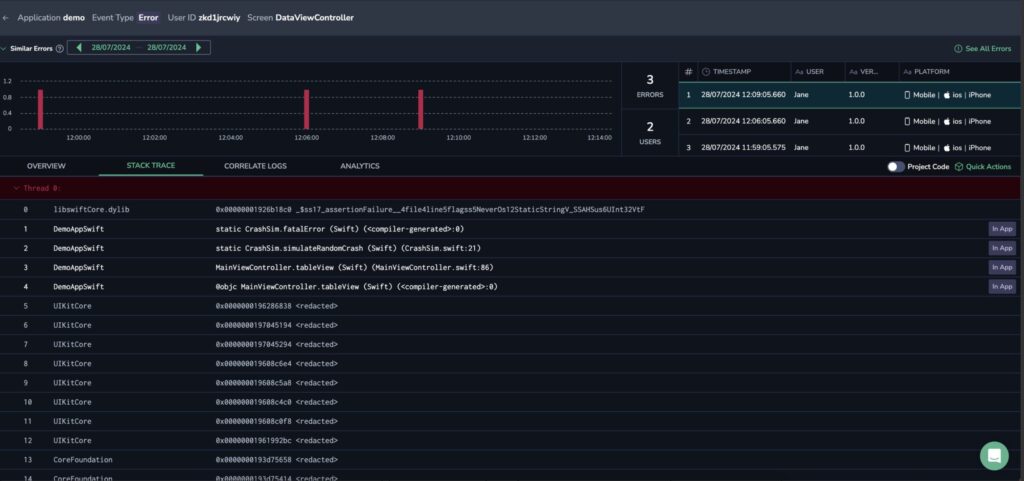
As part of Error Tracking, Coralogix requires dSYM (debug information) files to interpret your stack traces. The symbolization process converts the stack traces in raw format back into readable function names, file names, and line numbers related to the crash.
To symbolicate your stack traces, locate and upload your .dSYM files to Coralogix using the `coralogix-rum-cli upload-dsym` command.
[](https://docs-docusaurus.kinsta.page/assets/images/Screenshot-2024-08-07-at-12.07.38-1024x481-facfe1b180ff4500310fc4bb28fb8482.jpg)
## Prerequisites[](#prerequisites "Direct link to Prerequisites")
* Before sending your data, verify that your S3 bucket has been properly set up and configured. For details on using an S3 bucket for data archiving, refer to the [Coralogix documentation on S3 buckets](https://docs-docusaurus.kinsta.page/user-guides/data-flow/s3-archive/connect-s3-archive/.md).
* To use this API you need to [create](https://docs-docusaurus.kinsta.page/user-guides/account-management/api-keys/api-keys/.md) a personal or team API key. It’s recommended to use permission presets, as they are automatically updated with all relevant permissions. Alternatively, you can manually add individual permissions.
| Preset | Action | Description |
| ------------ | ------------------------------------------------------------------------------------------------------------------------------------------------------------------------------------------------------------------ | ------------------------------------------------------------------------------------------------------------------------------------------------------------------------------------------------ |
| DataQuerying | `LEGACY-ARCHIVE-QUERIES:EXECUTE`
`LOGS.DATA-API#HIGH:READDATA`
`LOGS.DATA-API#LOW:READDATA`
`METRICS.DATA-API#HIGH:READDATA`
`SPANS.DATA-API#HIGH:READDATA`
`SPANS.DATA-API#LOW:READDATA` | Query Data from the Archive
Query Frequent Search Logs
Query Monitoring & Compliance Logs
Query Metrics
Query Frequent Search Spans
Query Monitoring & Compliance Spans |
## Find dSYM files[](#find-dsym-files "Direct link to Find dSYM files")
Every iOS application generates .dSYM files for each module. These files are crucial for reducing the application's binary size, which in turn allows for quicker download speeds. Each version of the application comes with its own set of .dSYM files.
## Upload dSYM files[](#upload-dsym-files "Direct link to Upload dSYM files")
Manually upload your dSYM file. If you have multiple dSYM files, they can be within a single zip with a maximum file size of 400 MB.
To manually upload your dSYM files:
```
coralogix-rum-cli upload-dsym -k -a -v -f -e -c -n -o
```
| Option | Description | Example |
| --------------------------------- | ------------------------------------------------------------------------------------------------------------------------------------------------------------------------------------------------------------------------------------------------------------- | ------------------------ |
| `-k, --private-key ` | The API key used to authenticate with the Coralogix API. | `-k abc123xyz` |
| `-a, --application ` | Name of the application. | `-a MyApp` |
| `-v, --version ` | The application version - must match the version used by RUM SDK. | `-v 1.0.0` |
| `-f, --folder-path ` | Path to the folder containing the source maps. | `-f /path/to/dsym/files` |
| `-e, --env ` | Choose the https\://api.:443 endpoint that corresponds to your Coralogix [domain](https://docs-docusaurus.kinsta.page/user-guides/account-management/account-settings/coralogix-domain/.md) using the domain selector at the top of the page. | |
| `-c, --commit-hash ` | GitHub commit hash (optional). | `-c 1a2b3c4d5e` |
| `-n, --repo-name ` | GitHub repository name (optional). | `-n my-repo` |
| `-o, --org-name ` | GitHub organization name (optional). | `-o my-org` |
| `-g, --generate ` | Update the existing release or create a new one if not found (optional). | `-g true` |
| `-h, --help` | Display help. | `-h` |
## View stack traces[](#view-stack-traces "Direct link to View stack traces")
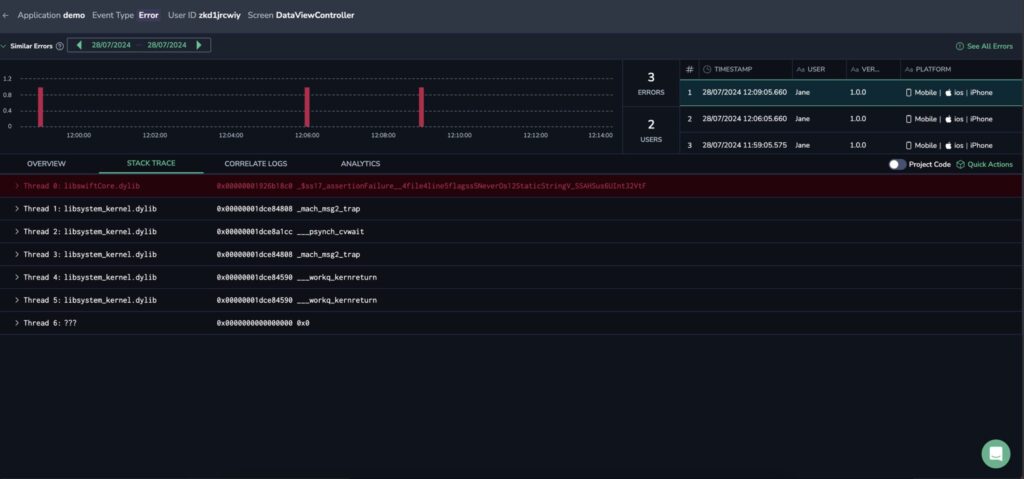
**STEP 1**. In your Error Tracking Screen, filter your errors by Mobile in the PLATFORM section.
**STEP 2**. Click on the error of interest. In the Error Drill-Down, select the STACK TRACE tab. Displayed will be the stack trace divided into the threads.
[](https://docs-docusaurus.kinsta.page/assets/images/Screenshot-2024-08-07-at-12.13.10-1024x479-87cbc0235a8684fa0eaaba0ff67b2253.jpg)
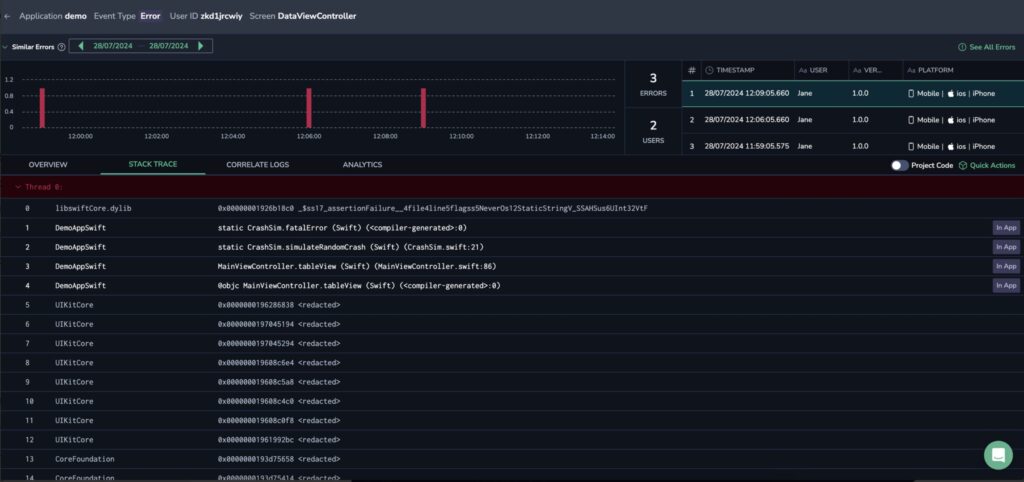
**STEP 3**. Click on the thread drop-down to view its frames.
[](https://docs-docusaurus.kinsta.page/assets/images/Screenshot-2024-08-07-at-12.14.43-1024x482-208c3e923832a32d41e2de197cb59d0b.jpg)
## Limitations[](#limitations "Direct link to Limitations")
dSYM files are limited to 400 MB.
## Additional resources[](#additional-resources "Direct link to Additional resources")
| | |
| ------------------- | ----------------------------------------------------------------------------------------------- |
| Coralogix Endpoints | [Coralogix Endpoints](https://docs-docusaurus.kinsta.page/integrations/coralogix-endpoints/.md) |