Set up with minikube
This guide helps you deploy a local Kubernetes environment using Minikube, install the Coralogix OpenTelemetry agent and collector, and connect everything to Infrastructure Explorer.
With this setup, you can:
- Deploy a complete observability stack locally using Minikube
- Generate realistic telemetry data with the OpenTelemetry Demo application
- Collect and forward infrastructure data to Coralogix
- Verify that your logs, metrics, and traces are flowing end to end
Prerequisites
Before you begin, ensure the following are installed and configured:
- Minikube,
kubectl, and Helmv3.x - Docker Desktop (used by Minikube driver)
- A Coralogix account with a valid Send Your Data API key
- Minimum system resources: 4 CPU cores and 6 GB RAM
- Coralogix Helm chart version
0.0.133or later (required for Infrastructure Explorer support)
Setup options
Two ways to deploy:
- Use the Kubernetes Complete Observability Integration
- Follow the step-by-step guide below (CLI-based installation)
Step-by-step installation
Step 1: Install required tools
# Install Minikube
curl -LO https://storage.googleapis.com/minikube/releases/latest/minikube-linux-amd64 \
  && sudo install minikube-linux-amd64 /usr/local/bin/minikube

# Install kubectl
curl -LO "https://dl.k8s.io/release/$(curl -L -s https://dl.k8s.io/release/stable.txt)/bin/linux/amd64/kubectl" \
  && chmod +x kubectl && sudo mv kubectl /usr/local/bin/

# Install Helm 3
curl https://raw.githubusercontent.com/helm/helm/main/scripts/get-helm-3 | bash
Step 2: Start a Minikube cluster
Spin up a two-node cluster (or use a single-node if preferred):
minikube start --nodes 2 --driver=docker
Step 3: Add the Coralogix Helm repository
helm repo add coralogix https://cgx.jfrog.io/artifactory/coralogix-charts-virtual
helm repo update
Step 4: Create Coralogix secret
Replace <YOUR_PRIVATE_KEY> with your actual API key:
kubectl create namespace coralogix && \
kubectl create secret generic coralogix-keys \
  --namespace coralogix \
  --from-literal=PRIVATE_KEY=<YOUR_PRIVATE_KEY>
Step 5: Create your values.yaml
This configuration enables Infrastructure Explorer and optimizes the data footprint.
global:
  domain: <YOUR_CORALOGIX_ACCOUNT_DOMAIN>
  clusterName: <YOUR_CLUSTER_NAME>

opentelemetry-cluster-collector:
  presets:
    reduceResourceAttributes:
      enabled: true
    kubernetesResources:
      enabled: true
      periodicCollection:
        enabled: true
      dropManagedFields:
        enabled: true

opentelemetry-agent:
  presets:
    spanMetrics:
      histogramBuckets:
        - 1ms
        - 4ms
        - 10ms
        - 20ms
        - 50ms
        - 100ms
        - 200ms
        - 500ms
        - 1s
        - 2s
        - 5s
    headSampling:
      enabled: true
      percentage: 10.0
    logsCollection:
      reduceLogAttributes:
        enabled: true
    hostMetrics:
      process:
        enabled: true
    reduceResourceAttributes:
      enabled: true
  targetAllocator:
    enabled: false

opentelemetry-ebpf-profiler:
  enabled: false

opentelemetry-gateway:
  presets:
    reduceResourceAttributes:
      enabled: true
Step 6: Deploy the Coralogix integration
helm upgrade --install otel-coralogix-integration coralogix/otel-integration \
  --namespace coralogix \
  --create-namespace \
  --render-subchart-notes \
  -f <values.yaml file path>
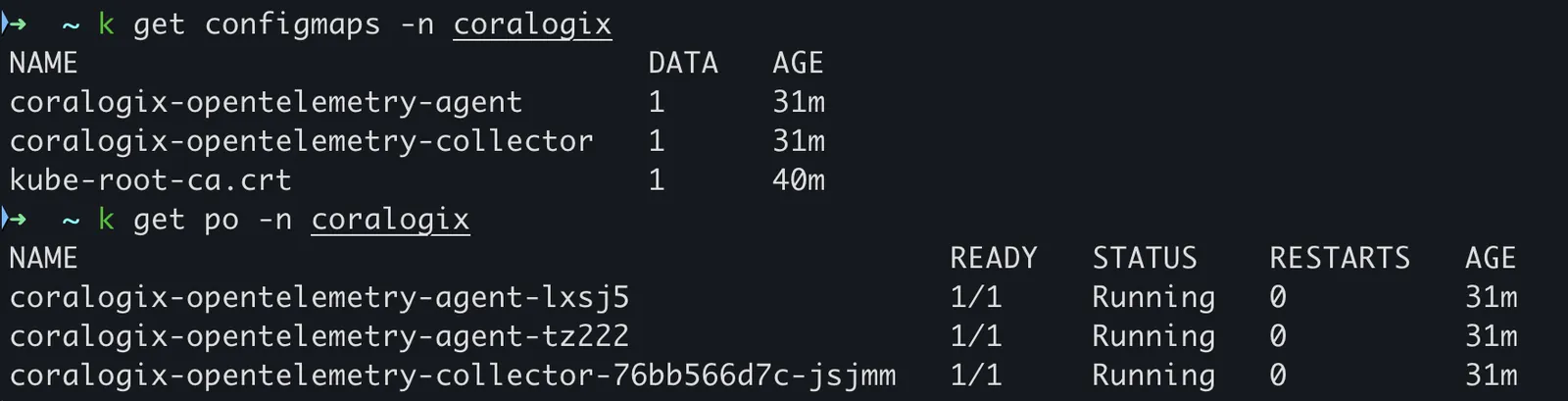
The Coralogix agent and collector should now be running in the coralogix namespace.
Next steps
Simulate realistic traffic and test end-to-end observability by deploying the OpenTelemetry demo app.
Related resources
Last updated on