Dataset management
Dataset Management is the central place to view, configure, and create datasets across your dataspaces. Navigate to Data Flow, then Dataset Management.
The page is organized into tabs by dataspace:
- Default — view predefined datasets and create user-defined datasets
- System — enable or disable Coralogix-managed system datasets
Default datasets
The Default tab lists all datasets in the default/ dataspace. The predefined logs and spans datasets are shown as placeholders and cannot be edited. User-defined datasets you create appear below them.
Hover over a dataset row to access the following actions:
- Edit the dataset description and access policy.
- Delete the dataset.
- View in Explore to open the dataset with the query
source default/<dataset-name>pre-filled.
Create a user-defined dataset
Create a custom dataset to isolate a specific log stream, apply access policies, and route data to it via TCO Optimizer.
-
Select the Default tab.
-
Select Create Dataset.
-
In Dataset name, enter a unique name. Names must be unique within
default/and cannot be changed after creation. -
In Description, enter an optional description.
-
In Bucket name, the storage bucket is inherited from your archive configuration. Optionally, enter a different bucket name.
-
Under Access Policy, optionally toggle Enabled Access Policy on to restrict access and configure exception rules.
WarningWhen the access policy is disabled, everyone has read access to the dataset. When enabled, you can create exceptions to this default behavior.
-
Select Create.
For a full walkthrough including TCO routing and access control, see User-defined datasets.
System datasets
The system/ dataspace contains Coralogix-managed datasets that store internal metadata about your environment, including schema changes, alert history, and audit logs.
System datasets must be manually enabled before they start ingesting data.
Hover over a dataset row to access the following actions:
- Edit the access policy and quota limits.
- View in Explore to open the dataset with the query
source system/<dataset-name>pre-filled.
Enable or disable a dataset
For both default and system datasets, toggle Write Access to start or stop data ingestion. Read access and other actions are determined by the access policy.
Once enabled:
- All users can query the dataset.
- The dataset counts toward your daily ingestion quota.
- Previously ingested data remains accessible even if you later disable the dataset.
Disabling a dataset stops ingestion but does not delete or archive stored data. Any configured quota limit is preserved and takes effect again when you re-enable the dataset.
The notification.deliveries dataset is hosted by Coralogix and enabled by default for all environments. It does not count toward your ingestion quota. Alerts record delivery failures, while Cases record both successful and failed deliveries.
Configure and edit a dataset
Hover over a system dataset row and select the edit icon to open the Edit Dataset dialog box. From here you can update the description, change the storage bucket, set a per-dataset quota limit, and configure the access policy.
-
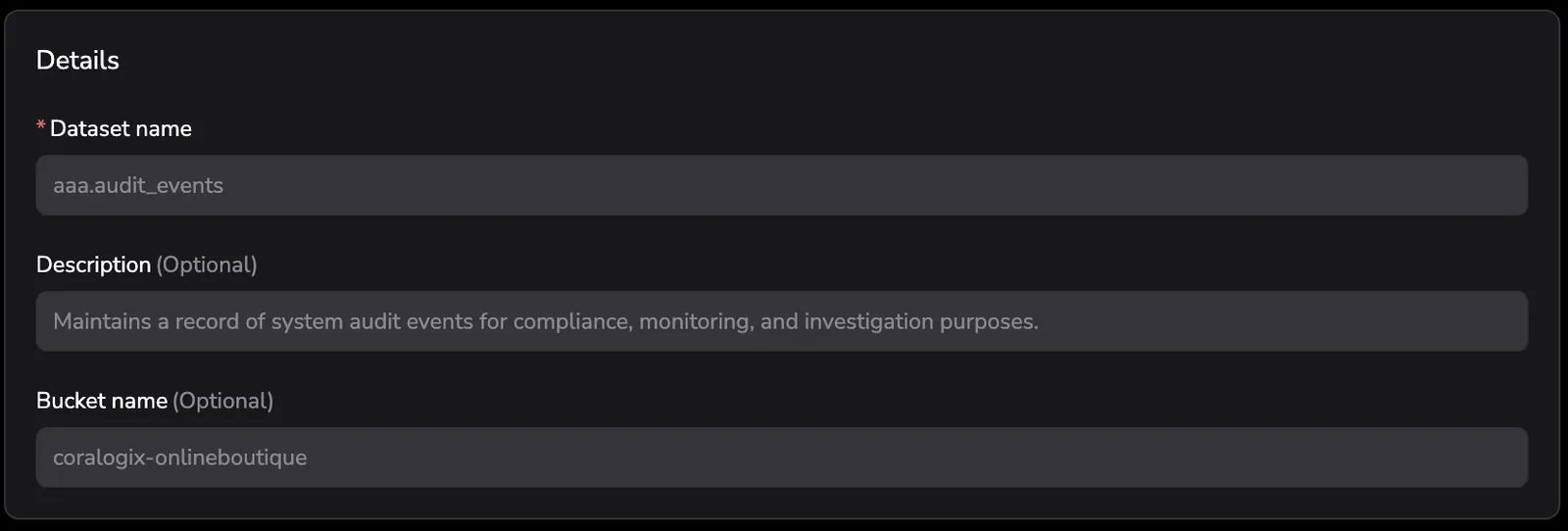
In the Details section, optionally edit the Description and Bucket name. The Dataset name is fixed and cannot be changed.
-
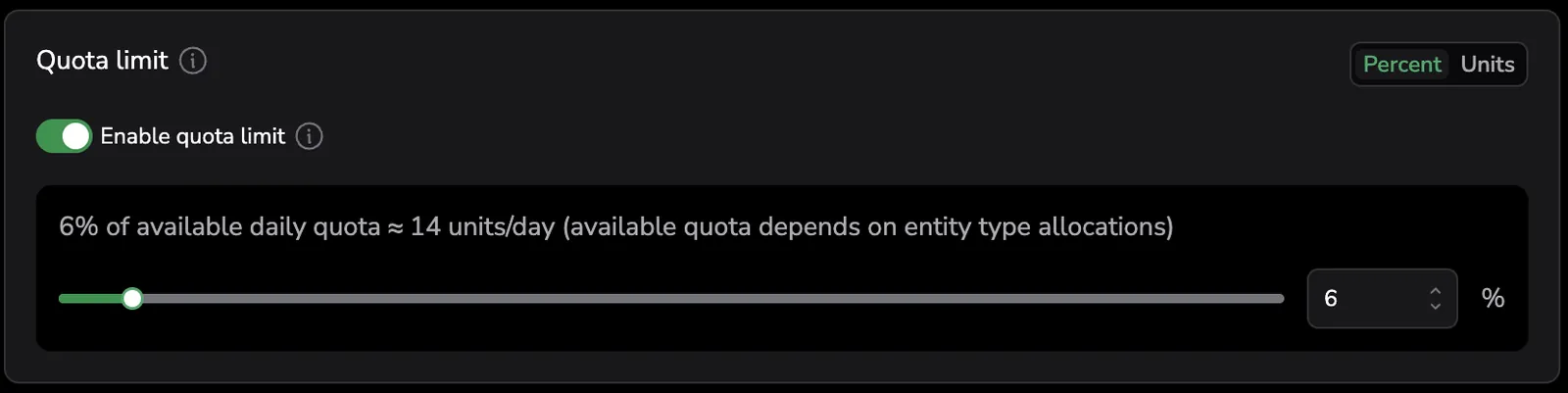
Under Quota limit, optionally toggle Enable quota limit on to cap daily ingestion for the dataset. When ingestion reaches the limit, it halts for the rest of the calendar day. At 00:00 UTC, the counter resets and ingestion resumes. Previously ingested data remains accessible even after ingestion stops.
Quota limits are based on the daily units a dataset can consume — its available daily quota. This pool comes from one of the following sources:
- Units allocated to this dataset specifically, or to its entity type as a whole (such as
logs), in Quota Rules. - The unallocated pool of units remaining after allocations to other entity types (such as
metricsorspans) are subtracted.
Select an input mode:
- Percent — enter the limit as a percentage of the available daily quota. The slider hard-stops at the allocatable amount after subtracting reservations by other datasets in the same entity type.
- Units — enter the limit as an absolute number of CX Units, shown as
units/day.
As you move the slider, the dialog displays the live conversion:
{N}% of available daily quota ≈ {M} units/day (available quota depends on entity type allocations)For example, 11% ≈ 5 units/day, and 93% ≈ 43 units/day. The slider moves in integer steps (1% or 1 unit).
- Units allocated to this dataset specifically, or to its entity type as a whole (such as
-
Under Access Policy, optionally toggle Enabled Access Policy on to restrict access and configure exception rules. For details, see Access policies.
-
Select Save.
The Quota column in the System datasets table shows current usage against the configured limit (for example, 5 units/day / 43 units/day). Rows with no quota configured display —.
Ingestion halts immediately when the quota limit is reached, with no prior notification or grace period. Reaching the limit blocks ingestion but does not eliminate costs — reserve units for this dataset in Quota Rules to avoid them.
Permissions
Access to Dataset management depends on your dataset permissions. You see only the tabs you have access to — System datasets, Default datasets, or both — and the actions available on each dataset depend on your permission level.
| Capability | Permission |
|---|---|
| View and filter system datasets | SYSTEM-DATASETS:READCONFIG |
| Edit and manage system datasets | SYSTEM-DATASETS:MANAGE |
| View default (team) datasets | TEAM-DATASET-RULES:READCONFIG |
| Create a default dataset | TEAM-DATASETS:CREATE |
| View a dataset's access policy | SYSTEM-DATASETS:READACCESSPOLICY, TEAM-DATASETS:READACCESSPOLICY |
| Edit a dataset's access policy | SYSTEM-DATASETS:UPDATEACCESSPOLICY, TEAM-DATASETS:UPDATEACCESSPOLICY |
With read access only, you can view and filter datasets but not edit them. Editing a dataset — toggling write access or changing its quota limit — requires manage access. Viewing and editing a dataset's access policy is controlled separately by the access-policy permissions above; without them, the Access Policy block is hidden or read-only.
For the full list of permissions, see Permissions list.