Repository breakdown
Code Agents Intelligence doesn't just tell you how much your company spent on coding agents — it tells you what that money was spent on. It attributes every coding-agent session to the repository it touched, then splits cost, tokens, and code impact across those repositories — and between work your company owns and everything else. This is the repository breakdown: it lets you measure the impact of every dollar by showing what each repository is getting for the spend, surfacing company code being built in personal projects, and keeping the Code Agents license funding work the company actually owns.
Activity splits into two classes:
- Managed — repositories owned by an Organization you've configured as yours.
- Unmanaged — everything else: personal projects, external clones, and private repos running on the company's license.
Repository breakdown is available for Claude Code today. Support for additional agents — starting with Copilot — is rolling out.
Use cases
Two stories that show what the repository breakdown makes possible. Same trigger, different conclusions. Expand each one to follow the drill.
You notice a sharp spike in Claude Code spend on the Cost tab — $7K in the past hour. The question forms instantly: is this work the company is paying for, or work the company is losing?

Switch to the Repositories tab. The Repo type pie tells you where the money's actually going.
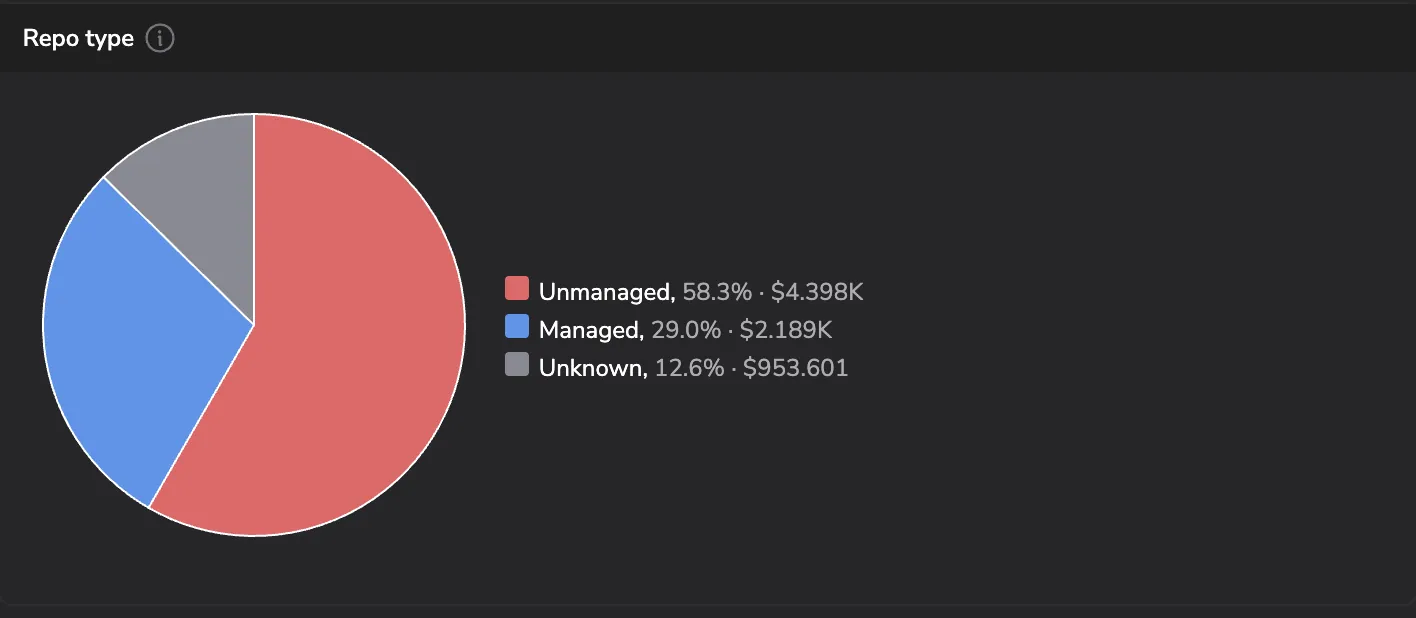
58% on Unmanaged is a lot of money on code outside your organization. Select the slice. The drawer scoped to Unmanaged surfaces every user contributing, ranked by cost, with the specific repos they touched.
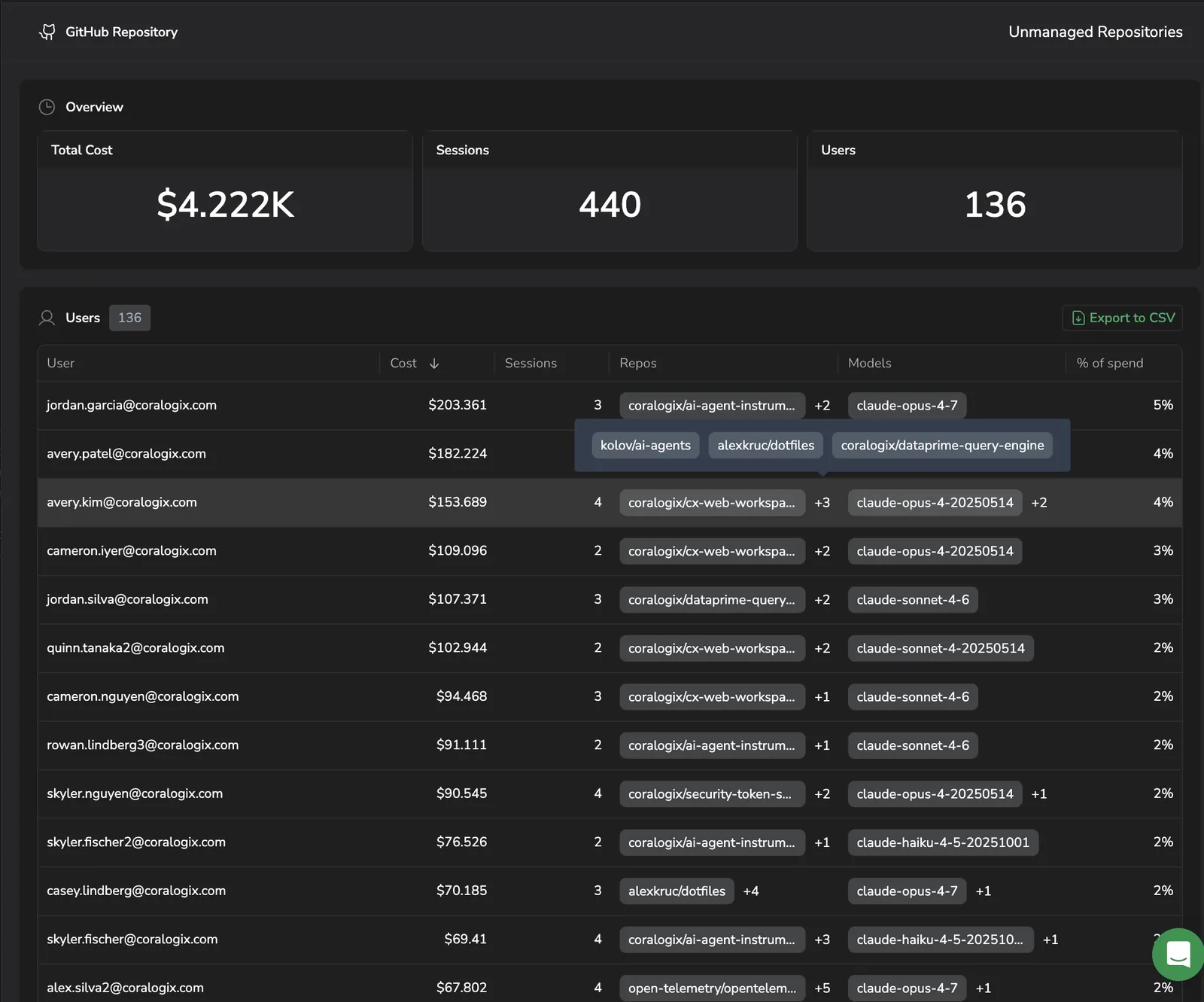
Scan the table for a repo name that sounds like internal work but lives on a personal account — knowledge-base, architecture-notes, anything that maps to internal intellectual property.
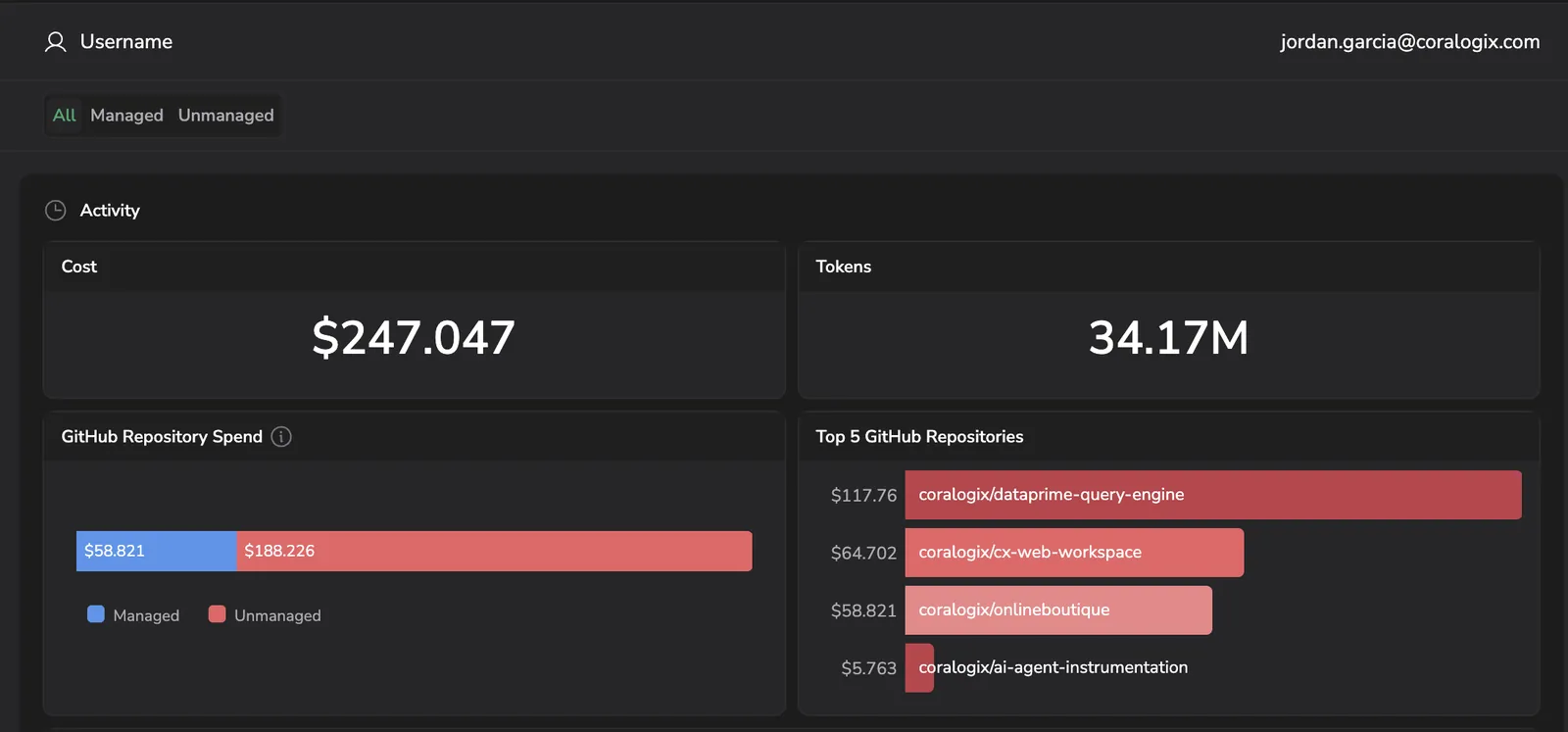
Three-quarters of this developer's Claude Code spend is going into a personal repo that holds company-relevant code. When they leave the organization, that work leaves with them — and the company has no claim on the IP they built.
What you do with this: you now have the data and the receipts to surface the conversation with the developer early — and route the work back into your organization's GitHub before the IP walks out the door.
Same view, different question. You're not chasing a spike — you're running the routine FinOps audit: of every dollar the Code Agents license is spending, how much is going into work the company actually owns?
The number itself isn't the question. Where that number is going is. Switch to the Repositories tab, where the Repo type pie splits spend between code your organization owns and code it doesn't.
More than half the spend — $4.4K on Unmanaged — is buying agent capacity on code outside your organization. Some of that is legitimate (external clones, exploratory work), and some of it isn't. Select the Unmanaged slice. The drawer ranks every developer contributing to that bucket by cost, with the specific repo names they touched alongside.
This time you're scanning for repo names that don't fit company work at all — weekend-game, myschool-startup, family-website. Each one of those is the company's paid agent capacity being spent on a developer's personal project. Pick the user with the most spend against names like that and select their row.
The user drawer breaks that developer's spend down two ways. The Repository Spend stacked bar shows the split between company work and personal projects in a single glance — so you can see at once whether this developer's company-license use is mostly legitimate with a personal-project tail, or mostly personal with a thin company veneer. The Tokens over time chart, filtered to Unmanaged, then shows when that personal activity is actually happening — and that timing is what shapes the conversation.
If the unmanaged usage clusters during work hours, the personal project is being built on company time, and the conversation is about budget and time. If it recurs week after week at off-hours, the company's Code Agents license is funding ongoing personal work, and the conversation is about usage policy. If it's a one-off burst on a weekend with low cost, it's a hobby project on someone's own time — probably not worth flagging.
The data tells you which conversation to have. More importantly, it lets you have it with receipts in hand instead of suspicion.
What you need
- The
AI-CODE-AGENTS:READpermission to view the Code Agents dashboards and the repository breakdown. - The
AI-CODE-AGENTS:MANAGEpermission to manage the Code agent settings — adding and editing the Organizations that classify repositories as Managed or Unmanaged. See Permissions. - At least one coding agent connected to Coralogix. See Code Agents Intelligence.
- Repository attribution enabled for the agent, so sessions report the repository they touched. For Claude Code, see Repository breakdown on the integration page.
Where you see it
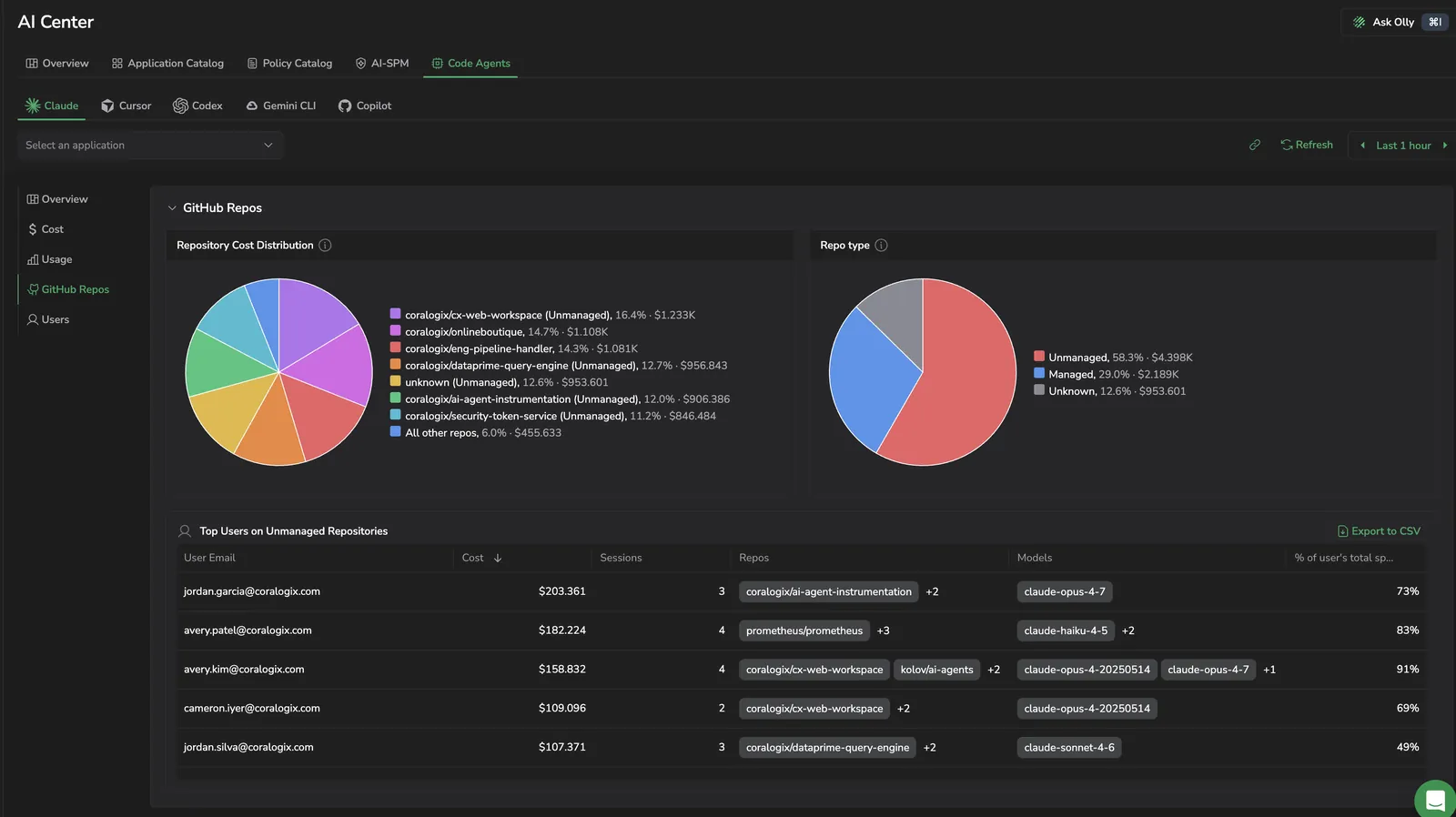
On the agent dashboard, the Repositories tab attributes every per-session signal to the repository it touched and splits it between Managed and Unmanaged repositories. Until you configure at least one Organization, every repository is classified as Unmanaged.
Classify repositories as Managed or Unmanaged
You decide which repositories count as company work by configuring Organizations in AI Center. An Organization is the account, group, or workspace that owns a repository — the segment that appears before the repository name in your Git provider. For github.com/octocat/Hello-World, the Organization is octocat.
- In Coralogix, go to Settings → AI Center → Code agent.
- On the Managed tab, select New organization, type an Organization (for example,
octocat), and add it with Enter. Add as many as you need, then save. - (Optional) On the Unmanaged tab, add an Organization — or a specific
organization/repository— to exclude it, even when a broader managed Organization would otherwise match. This is useful when most repositories under an Organization are company work but a few aren't.
To change an entry, open the ⋮ menu on its row and select Edit or Delete. Deleted entries are reclassified on the next refresh.
How classification resolves
- Provider-agnostic. Organizations work the same for GitHub, GitLab, Bitbucket, and other Git providers.
- Longest match wins. Among all entries that match a repository, the most specific (longest) one decides its class. An
octocat/Hello-Worldentry beats anoctocatentry for that repository. - Unmanaged breaks ties. When a managed and an unmanaged entry match with the same length, the repository is Unmanaged — an explicit exclusion overrides an equal-length inclusion.
- No match means unmanaged. A repository that matches no configured entry is Unmanaged.
- Enter bare names. Use the bare Organization (
octocat), not a URL. Full URLs such ashttps://github.com/octocat/Hello-World.gitare normalized toorganization/repositorybefore matching.
Find your Organization
The Organization is the segment that appears before the repository name in your Git provider — read it from the repository URL or the page header, then enter it without the repository name.
GitHub
In github.com/octocat/Hello-World, the Organization is octocat — the segment immediately after github.com/. For an organization account, it's the account name shown on the organization page and in every repository URL under it.

GitLab
In gitlab.com/gitlab-org/gitlab, the Organization is gitlab-org — the group immediately after gitlab.com/. For a project in a subgroup, use the top-level group: for gitlab.com/gitlab-org/charts/gitlab, the Organization is gitlab-org.

References by agent
Each agent has its own dashboard and its own setup for reporting repository data. References for additional agents appear here as support expands.
Claude Code
- Repositories tab — where the repository breakdown appears on the Claude dashboard.
- Send repository data — enable the repository-tracking hook so sessions report the repository they touched.